
I always had a non-ISP-supplied router when I was with Virgin Media, it offered a lot more out of the box than theirs did. But technology moves on, and Internet speeds get faster. So when I moved to YouFibre’s 10Gbps connection, I used their router as it offered 10Gbps speed, unlike my old one. It’s a Sagem one, and it is functional, but, speaking as a network engineer, it’s barely functional for what I want to see in terms of connectivity and client metrics, and useful features, such as time-based client blocking and ad-blocking, need to be offloaded to another system.
One of these other systems was an Eero mesh, which, again, worked well, but to get the best alongside the YouFibre service, the Eero needs to be in bridge mode, so loses the time-based blocking (I have sons that if left unchecked would be on their devices till the early hours, so cutting off the Internet at predefined times is a great feature – at least for me).
The other systems would be Pi-Hole running on Umbrel, or natively on a Raspberry Pi. The issue with this is that without monitoring these systems, we’d have a DNS black hole if they stopped running. The internet could be up, but useless without a working DNS server. This can be done using the Eero’s, but that would require a subscription to Eero+, which costs £99.99 a year. You get a few features with it, such as parental controls, VPN, password manager and threat protection. Not bad, but this is an extra cost on top of the initial hardware, and it’s another system to manage.
I could have used the Eero as the main Internet gateway, but the ports are capped at 2.5Gbps, and I’ve got a 10Gbps connection (which is probably overkill, especially when the rest of the network is running at 2.5Gbps – but it’s the principal).
The main prompt for me to migrate hardware was that the firewall on the Sagem absolutely sucks. Adding rules suck, and forget about editing rules. It just doesn’t happen. So, time to change.
Requirements-wise, it’s a fairly standard list:
- 10Gbps port – more than one would be good, but most of my home equipment is using 1GB ports, so the bottleneck won’t be at the LAN side of the gateway
- Wifi-mesh capable – so I can get rid of the Eero devices and have one vendor take care of the Internet gateway and the wifi
- Good network metric reporting – I like to see what traffic is going where and by what machine
- On-device Ad-blocking
- Time-based access – so I can make sure the kids arn’t on TikTok when they should be sleeping!
- Be around £200
VLANs would be a nice feature, so I can separate off the IoT devices, but not essential.
The one device I could find that filled the requirements was the Ubiquiti Express 7. At just £189, it’s a steal. It’s a lot smaller than the Sagem, and has a cool little LCD with information about the current client and traffic usage.
Changing YouFibre router for a Ubiquiti Express 7
When it came to swapping the equipment over, I made a list of the devices that needed to switch wifi networks, so that when I lost the YouFibre wifi, they wouldn’t be out of reach. It was just a BitCoin miner, an ESP32 PaperInk display (which can be fixed with ESPHome designer), and one mystery device (which turned out to be a ceiling fanlight which I had to reset to reconnect it back to Home Assistant).
The plan itself was simple. Set up the Express 7 locally using the Ubiquiti OS management server (UOS) and then change the IP to the 192.168.1.1 used in the network once the Sagem had been taken off the network. The Express 7 was adopted easily into the network and appeared in UOS. I had a play with it and all seemed good to switch it over.
Attempt 1: Unplug the YouFibre router and wait
The first attempt was around 10PM, after the kids had gone to bed. Having done my reading, I unplugged the Sagem for an hour before connecting the Express 7 to the ONT on the wall. After an hour, I plugged it into the Unifi box and hoped that it would get the same (static) external IP.
It did not.
It did say that I should “Reposition to connect”, which wasn’t helpful in any way. It turns out that having meshing enabled causes this.
I rebooted a few times, then decided to revert and plugged the ONT back into the Sagem. After a few minutes, we had Internet again.
Attempt 2: MAC cloning on the Ubiquiti Express 7
I did a factory reset of the Express 7 (just in case).
Other reports on the Internet bestowing praise on the ease with which they swapped routers involved cloning the Sagem router’s Internet MAC address (the one from the GUI, not from the label underneath the router, as that’s the LAN-side, not the WAN-side).
Setting the MAC address in the Unifi was easy enough, but swapping the cables over still gave me no Internet. Despite reboots.
Oh, and I got a 100.94.x.x IP address, which was probably a CGNAT IP (as its in that range), but not the static IP I pay for.
Attempt 3: Static IP addressing
Everything I read said to use DHCP, but then everything I read also said it was easy. So I tried MAC cloning with a static IP and that didn’t work either.
Attempt 4: Unplug the ONT
Thank God for the FIFA World Cup. It managed to distract the kids long enough that I could take the Internet offline (well done Spain!). This was a bit of a last-ditch (before I return it and sulk) effort. The settings were factory-fresh defaults:
- DHCP on
- No MAC cloning
- Mesh parent
I unplugged the ONT’s power for an hour, then plugged it back in and connected the Unifi box to the ONT.
Success.
I had Internet, and all it took in the end was patience!
Impressions of the Unifi
I’m pleased with the Unifi box. But it’s definitely a bit of a learning curve. I am, for instance, topping out at 3Gbps, not 10:
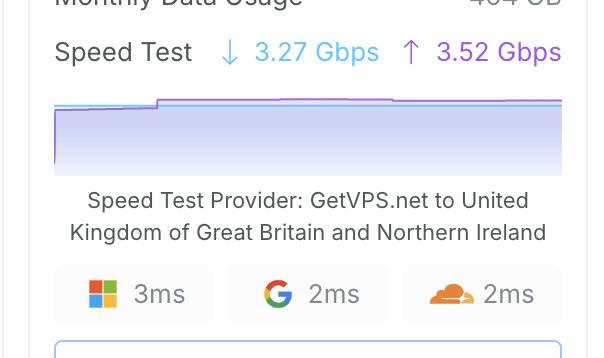
There is probably some IDS/IPS in effect, which is limiting the throughput.
It’s nice to see what kind of traffic is going through the network:
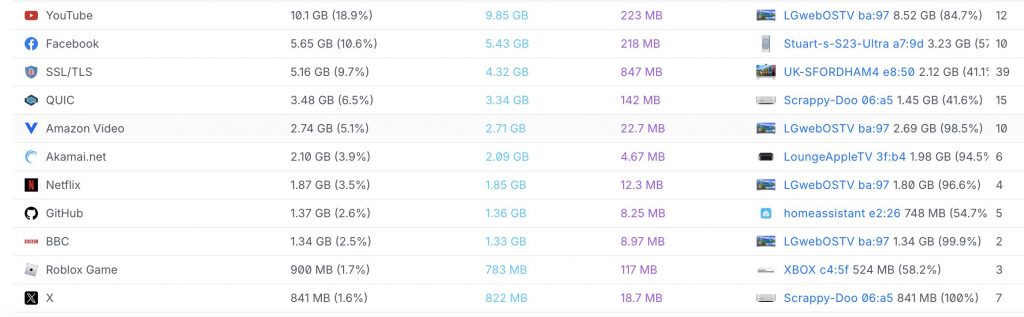
And it is definitely nicer to see who the culprits are (mainly my kids watching YouTube):
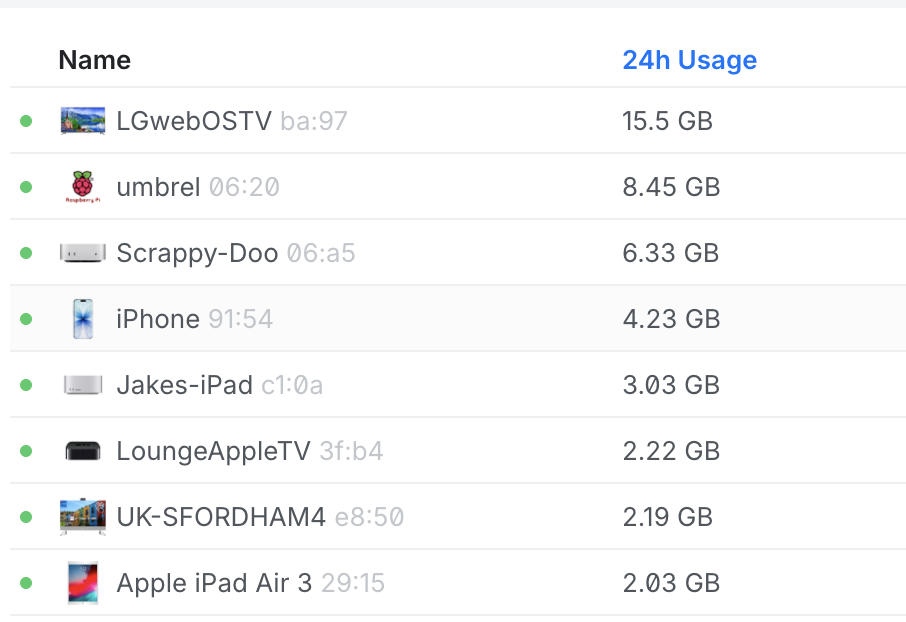
The little icons are cool. This little Ubiquiti UniFi Express 7 has lots of features that a network nerd like me finds useful, like inbuilt ad-blocking:
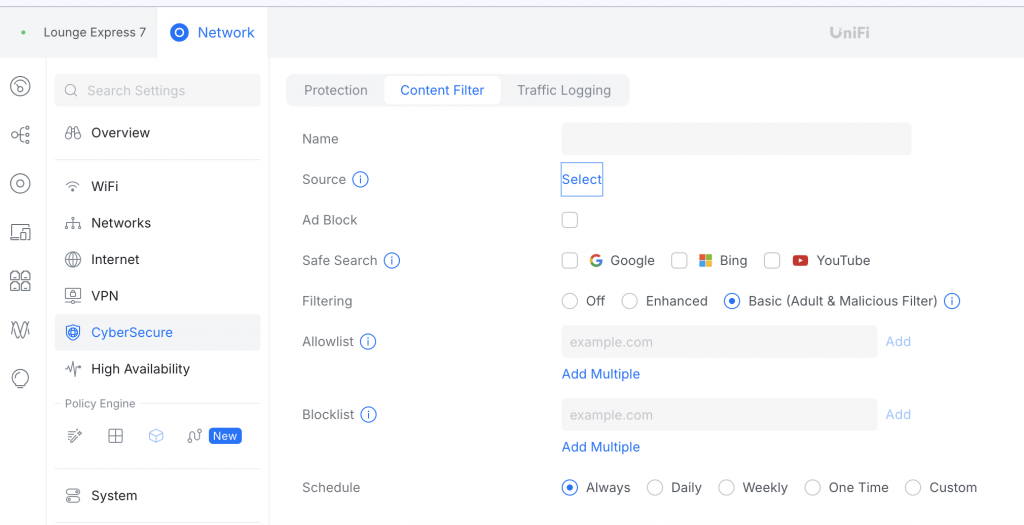
Now, you’ll notice I haven’t turned it on yet, so I’ll do a follow-up post about that and the 3Gbps limit I’m hitting. Overall, though, I’m very pleased with the result, and for less than £200, the Ubiquiti Express 7 is a brilliant replacement for the YouFibre router!