
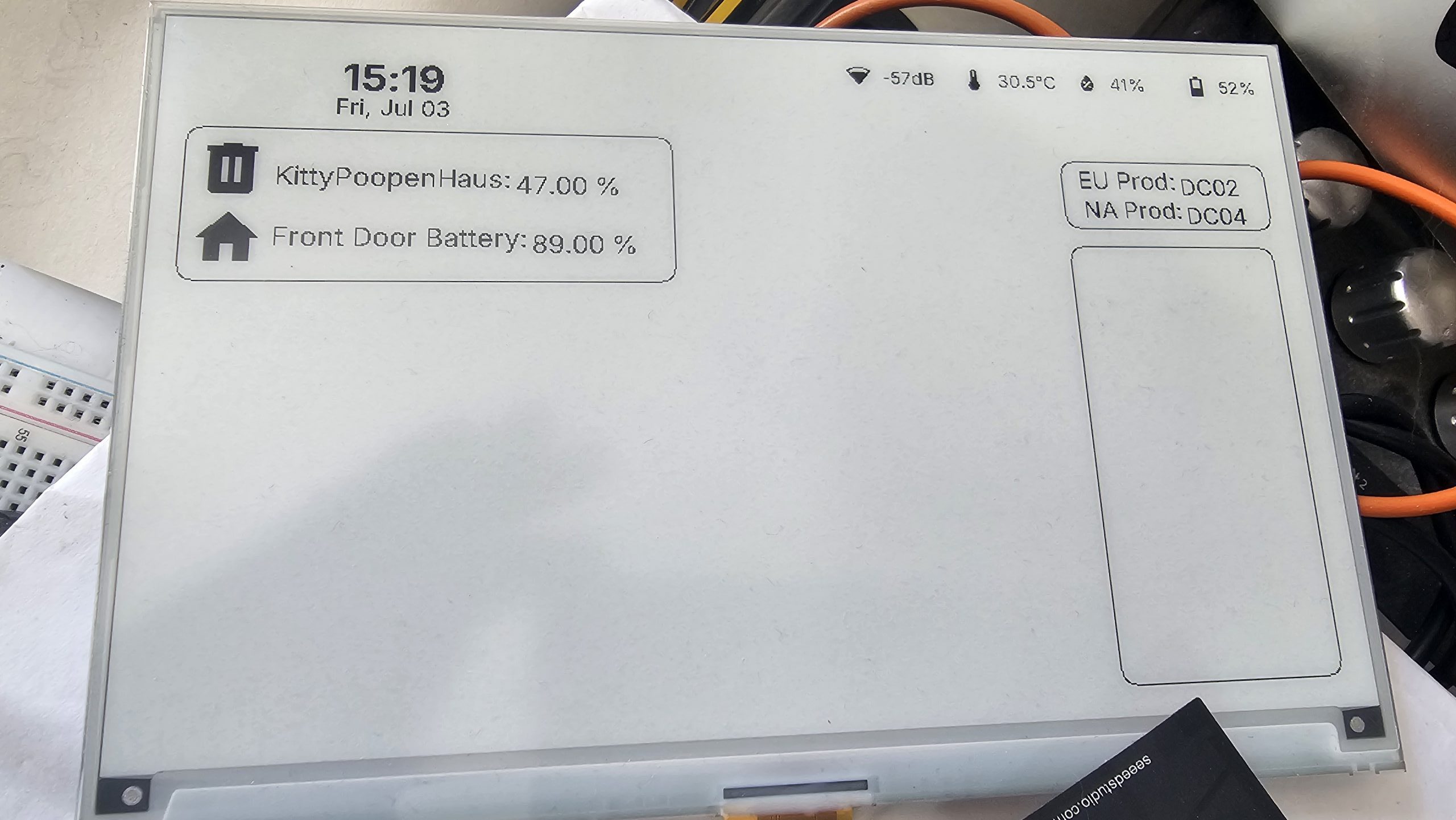
I recently picked up a Seeed Studio 7.5″ paperink display from AliExpress after reading a blog post from smarthomesecrets.ca. Annoyingly, I picked the option without a battery, so then (after buying several connectors and another battery) went and bought another board and compatible battery from The Pi Hut. The board and battery were like £20, so not bad. I need to get a proper case for it though!
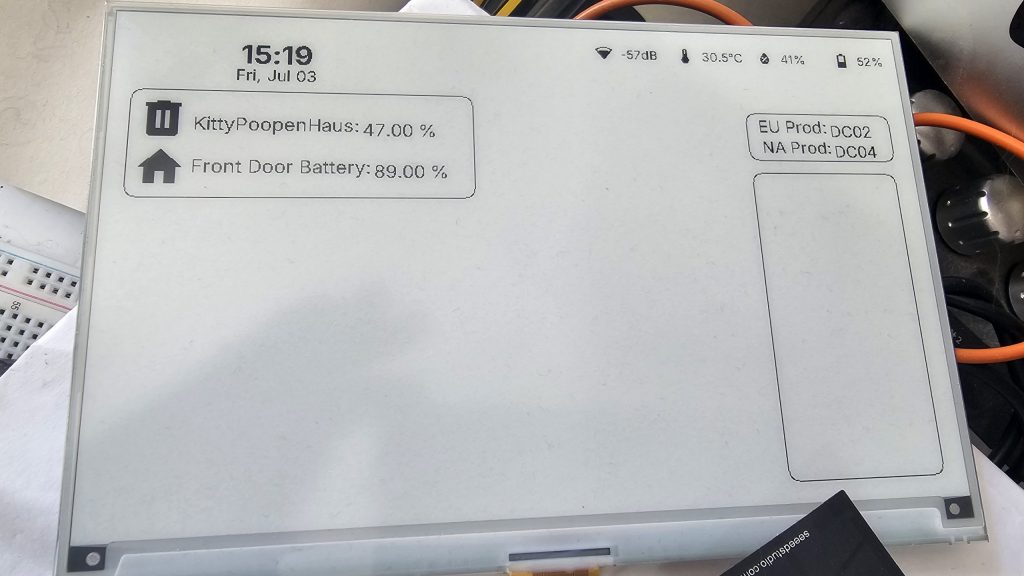
Using this with Home Assistant and the ESPHome Designer and ESPHome Builder is a lot of fun. Not without its issues, but fun nonetheless.
With the ESPHome designer, there is a lot of drag-and-drop from the widgets menu, and then it’s a case of copying this into ESPHome Designer, compiling it and flashing the board.
The major issue I had was getting it to display the battery status.
Without including my Wifi configuration, the basics to get the display (and battery data) are to set the device names (substitutions), the esphome bit, esp32, and output. I’ve also left out the parts for my front door battery and “KittyPoopenHaus”, Because you really aren’t interested in how often my cats go to the toilet.
Under “esphome:” we need to enable the battery components. We set the framework to “arduino” under “esp32:” and set the output pin (GPIO6) to enable the battery.
substitutions:
  device_name: esphome-trmnl
  friendly_name: trmnl

esphome:
  name: ${device_name}
  friendly_name: ${friendly_name}
  on_boot:
    priority: 600
    then:
      - output.turn_on: bsp_battery_enable
      - delay: 200ms
      - component.update: battery_voltage
      - component.update: battery_level

esp32:
  board: seeed_xiao_esp32s3
  framework:
    type: arduino
logger:
output:
  - platform: gpio
    pin: GPIO6
    id: bsp_battery_enable
Sensors
Under “sensors:” we set the battery_level, along with a bit of calibration. We also have a wifi_signal sensor as well as my temperature and humidity sensors through a Sonoff gadget.
sensor:
  - platform: adc
    pin: GPIO1
    name: "Voltage"
    id: battery_voltage
    device_class: voltage
    unit_of_measurement: "V"
    state_class: measurement
    entity_category: "diagnostic"
    update_interval: 60s
    attenuation: 12db
    filters:
      - multiply: 2.0
  - platform: template
    name: "Battery"
    id: battery_level
    unit_of_measurement: "%"
    icon: "mdi:battery"
    device_class: battery
    state_class: measurement
    entity_category: "diagnostic"
    lambda: 'return id(battery_voltage).state;'
    update_interval: 300s
    filters:
      - calibrate_linear:
          - 4.15 -> 100.0
          - 3.96 -> 90.0
          - 3.91 -> 80.0
          - 3.85 -> 70.0
          - 3.80 -> 60.0
          - 3.75 -> 50.0
          - 3.68 -> 40.0
          - 3.58 -> 30.0
          - 3.49 -> 20.0
          - 3.41 -> 10.0
          - 3.30 -> 5.0
          - 3.27 -> 0.0
      - clamp:
          min_value: 0
          max_value: 100
  - platform: wifi_signal
    id: wifi_signal_dbm
    internal: true
  - platform: homeassistant
    id: sensor_sonoff_snzb_02dr2_temperature
    entity_id: sensor.sonoff_snzb_02dr2_temperature
    internal: true
  - platform: homeassistant
    id: sensor_sonoff_snzb_02dr2_humidity
    entity_id: sensor.sonoff_snzb_02dr2_humidity
    internal: true
Display
The display itself is a waveshare_epaper. The model is set to “7.50inv2” and the update_interval is set to never, as these things only have a finite number of refreshes before they expire.
Note that COLOR_WHITE and COLOR_BLACK are reversed; this is due to a bug in ESPHome Builder that was rectified in a newer version.
display:
  - platform: waveshare_epaper
    id: epaper_display
    cs_pin: GPIO44
    dc_pin: GPIO10
    reset_pin: GPIO38
    busy_pin:
      number: GPIO4
      inverted: true
    model: "7.50inv2"
    rotation: 0
    update_interval: never
    reset_duration: 2ms

    lambda: |-
      const auto COLOR_WHITE = Color(0, 0, 0);
      const auto COLOR_BLACK = Color(255, 255, 255);
      const auto COLOR_RED = Color(255, 0, 0);
      const auto COLOR_GREEN = Color(0, 255, 0);
      const auto COLOR_BLUE = Color(0, 0, 255);
      const auto COLOR_YELLOW = Color(255, 255, 0);
      const auto COLOR_ORANGE = Color(255, 165, 0);
      auto color_off = COLOR_WHITE;
      auto color_on = COLOR_BLACK;
Widgets
For the widgets, I have a sensor bar across the top, which has wifi strength, temperature, humidity and the battery level. The battery uses the “bat_is_local” flag.
        // widget:template_sensor_bar id:w_mqnjwbq7kd1uv type:template_sensor_bar x:445 y:0 w:355 h:43 temp_entity:"sensor.sonoff_snzb_02dr2_temperature" hum_entity:"sensor.sonoff_snzb_02dr2_humidity" bat_entity:"sensor.stuart_office_trmnl_battery_level" bat_is_local:true background_color:"white" border_color:"black" color:"theme_auto" font_family:"Inter"
                {
                  auto draw_filled_rrect = [&](int x, int y, int w, int h, int r, auto c) {
                    it.filled_rectangle(x + r, y, w - 2 * r, h, c);
                    it.filled_rectangle(x, y + r, r, h - 2 * r, c);
                    it.filled_rectangle(x + w - r, y + r, r, h - 2 * r, c);
                    it.filled_circle(x + r, y + r, r, c);
                    it.filled_circle(x + w - r - 1, y + r, r, c);
                    it.filled_circle(x + r, y + h - r - 1, r, c);
                    it.filled_circle(x + w - r - 1, y + h - r - 1, r, c);
                  };
                  draw_filled_rrect(445, 0, 355, 43, 8, color_off);
                  {
                    const char* wifi_icon = "\U000F092B";
                    if (id(wifi_signal_dbm).has_state()) {
                      float sig = id(wifi_signal_dbm).state;
                      if (sig >= -50) wifi_icon = "\U000F0928";
                      else if (sig >= -70) wifi_icon = "\U000F0925";
                      else if (sig >= -85) wifi_icon = "\U000F0922";
                      else wifi_icon = "\U000F091F";
                    }
                    it.printf(489 - 4, 22, id(font_material_design_icons_400_20), color_on, TextAlign::CENTER_RIGHT, "%s", wifi_icon);
                    if (id(wifi_signal_dbm).has_state()) it.printf(489 + 4, 22, id(font_inter_400_14), color_on, TextAlign::CENTER_LEFT, "%.0fdB", id(wifi_signal_dbm).state);
                    else it.printf(489 + 4, 22, id(font_inter_400_14), color_on, TextAlign::CENTER_LEFT, "--dB");
                  }
                  {
                    it.printf(578 - 4, 22, id(font_material_design_icons_400_20), color_on, TextAlign::CENTER_RIGHT, "%s", "\U000F050F");
                    if (id(sensor_sonoff_snzb_02dr2_temperature).has_state() && !std::isnan(id(sensor_sonoff_snzb_02dr2_temperature).state)) {
                      it.printf(578 + 4, 22, id(font_inter_400_14), color_on, TextAlign::CENTER_LEFT, "%.1f°C", id(sensor_sonoff_snzb_02dr2_temperature).state);
                    } else {
                      it.printf(578 + 4, 22, id(font_inter_400_14), color_on, TextAlign::CENTER_LEFT, "--°C");
                    }
                  }
                  {
                    it.printf(667 - 4, 22, id(font_material_design_icons_400_20), color_on, TextAlign::CENTER_RIGHT, "%s", "\U000F058E");
                    if (id(sensor_sonoff_snzb_02dr2_humidity).has_state()) it.printf(667 + 4, 22, id(font_inter_400_14), color_on, TextAlign::CENTER_LEFT, "%.0f%%", id(sensor_sonoff_snzb_02dr2_humidity).state);
                    else it.printf(667 + 4, 22, id(font_inter_400_14), color_on, TextAlign::CENTER_LEFT, "--%%");
                  }
                  {
                    const char* bat_icon = "\U000F0082";
                    float lvl = id(battery_level).state;
                    if (lvl >= 95) bat_icon = "\U000F0079";
                    else if (lvl >= 85) bat_icon = "\U000F0082";
                    else if (lvl >= 75) bat_icon = "\U000F0081";
                    else if (lvl >= 65) bat_icon = "\U000F0080";
                    else if (lvl >= 55) bat_icon = "\U000F007F";
                    else if (lvl >= 45) bat_icon = "\U000F007E";
                    else if (lvl >= 35) bat_icon = "\U000F007D";
                    else if (lvl >= 25) bat_icon = "\U000F007C";
                    else if (lvl >= 15) bat_icon = "\U000F007B";
                    else if (lvl >= 5) bat_icon = "\U000F007A";
                    else bat_icon = "\U000F0083";
                    it.printf(756 - 4, 22, id(font_material_design_icons_400_20), color_on, TextAlign::CENTER_RIGHT, "%s", bat_icon);
                    if (id(battery_level).has_state()) it.printf(756 + 4, 22, id(font_inter_400_14), color_on, TextAlign::CENTER_LEFT, "%.0f%%", id(battery_level).state);
                    else it.printf(756 + 4, 22, id(font_inter_400_14), color_on, TextAlign::CENTER_LEFT, "--%%");
                  }
                }
        // ────────────────────────────────────────
Fonts
Remember to update the fonts list so that the icons are displayed! The glyphs at the bottom of this part of the code should match those used in the battery code; “U000F007A”, for example.
font:
  - file:
      type: gfonts
      family: "Inter"
      weight: 700
      italic: false
    id: font_inter_700_28
    size: 28
    glyphsets: [GF_Latin_Kernel]
    ignore_missing_glyphs: true
  - file:
      type: gfonts
      family: "Inter"
      weight: 400
      italic: false
    id: font_inter_400_16
    size: 16
    glyphsets: [GF_Latin_Kernel]
    ignore_missing_glyphs: true
  - file:
      type: gfonts
      family: "Inter"
      weight: 400
      italic: false
    id: font_inter_400_14
    size: 14
    glyphsets: [GF_Latin_Kernel]
    ignore_missing_glyphs: true
  - file:
      type: gfonts
      family: "Inter"
      weight: 400
      italic: false
    id: font_inter_400_18
    size: 18
    glyphsets: [GF_Latin_Kernel]
    ignore_missing_glyphs: true
  - file:
      type: gfonts
      family: "Inter"
      weight: 400
      italic: false
    id: font_inter_400_19
    size: 19
    glyphsets: [GF_Latin_Kernel]
    ignore_missing_glyphs: true
  - file:
      type: gfonts
      family: "Roboto"
      weight: 600
      italic: false
    id: font_roboto_600_16
    size: 16
    glyphsets: [GF_Latin_Kernel]
    ignore_missing_glyphs: true
  - file: "fonts/materialdesignicons-webfont.ttf"
    id: font_material_design_icons_400_20
    size: 20
    glyphs: ["\U000F0079", "\U000F007A", "\U000F007B", "\U000F007C", "\U000F007D", "\U000F007E", "\U000F007F", "\U000F0080", "\U000F0081", "\U000F0082", "\U000F0083", "\U000F050F", "\U000F058E", "\U000F091F", "\U000F0922", "\U000F0925", "\U000F0928", "\U000F092B"]
  - file: "fonts/materialdesignicons-webfont.ttf"
    id: font_material_design_icons_400_48
    size: 48
    glyphs: ["\U000F02DC", "\U000F0A79"]
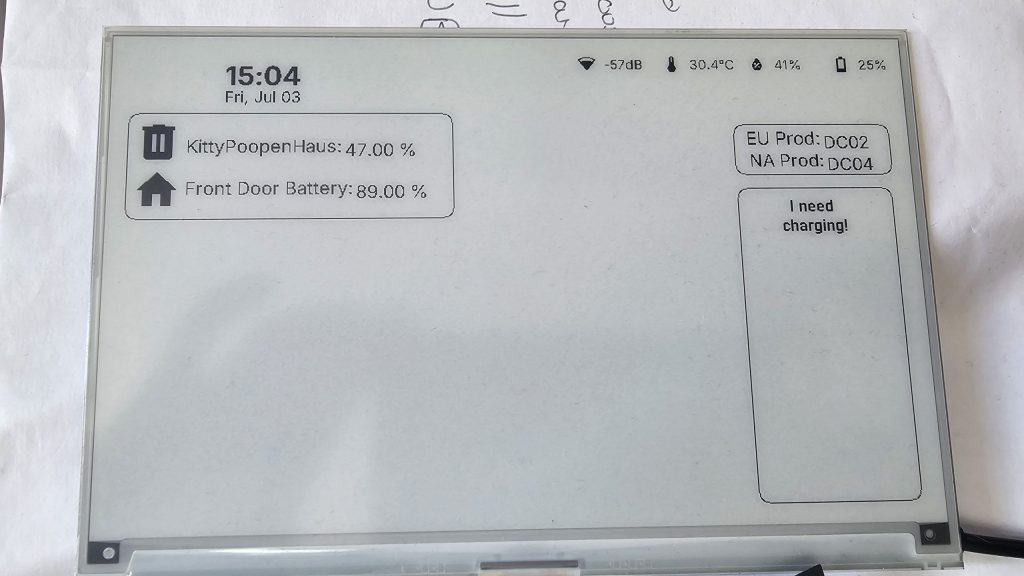
On the display is a rectangle, in which a message (“I need charging!”) will appear if the battery drops below 25%.
        // widget:rounded_rect id:w_mr3dhkjkt02qq type:rounded_rect x:623 y:154 w:160 h:310
                {
                  auto draw_rrect_border = [&](int x, int y, int w, int h, int r, int t, auto c) {
                    it.filled_rectangle(x + r, y, w - 2 * r, t, c);
                    it.filled_rectangle(x + r, y + h - t, w - 2 * r, t, c);
                    it.filled_rectangle(x, y + r, t, h - 2 * r, c);
                    it.filled_rectangle(x + w - t, y + r, t, h - 2 * r, c);
                    for (int dx = 0; dx <= r; dx++) {
                      for (int dy = 0; dy <= r; dy++) {
                        int ds = dx*dx + dy*dy;
                        if (ds <= r*r && ds > (r-t)*(r-t)) {
                          it.draw_pixel_at(x + r - dx, y + r - dy, c);
                          it.draw_pixel_at(x + w - r + dx - 1, y + r - dy, c);
                          it.draw_pixel_at(x + r - dx, y + h - r + dy - 1, c);
                          it.draw_pixel_at(x + w - r + dx - 1, y + h - r + dy - 1, c);
                        }
                      }
                    }
                  };
                  draw_rrect_border(623, 154, 160, 310, 10, 1, color_on);
                }
        // ────────────────────────────────────────
        // widget:label id:w_mr3dikp0npylb type:label x:636 y:158 w:128 h:30 text:"I need charging!" font_size:16 font_weight:600 text_align:"CENTER"
                if (id(battery_level).state < 25) {
                it.printf(700, 173, id(font_roboto_600_16), color_on, TextAlign::CENTER, "I need ");
                it.printf(700, 193, id(font_roboto_600_16), color_on, TextAlign::CENTER, "charging!");
                }
      }
I’ll change this so that it only displays if the message is going to be shown, though, to make it neater.
In the next post, I’ll look at how to control the screen refresh so the screen lasts longer.